Modification June 2023 Deploy program did not include a sample master item or hazard file. Fixed
June, 2022
Exporting Equipment to Text - The Description was truncated to 30 characters. Is now 1000 characters.
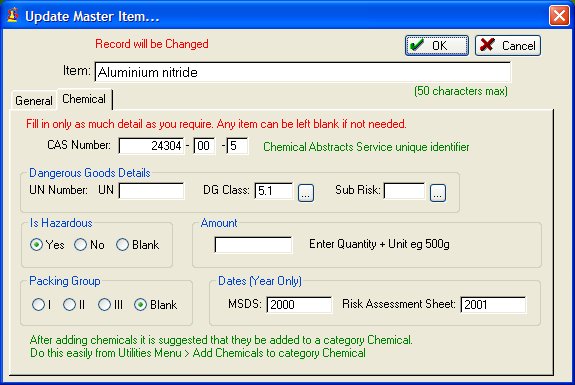
May 30, 2020 Changes related to Chemicals:
Changed the Risk Assessment Date from a Year to an actual Date.
Go to Utilities > Check Data Integrity to have the Year changed to a date in relevant Chem items. It will arbitrarily set the date as 1 April of what ever year was set.A Risk Assessment Reference field was added to the Master Item Chemical as was a Manufacturer. These items now appear on the Chemical registers reports.
New utility, Reset Window Locations will put all windows in a default location. Useful if Windows open off-screen, making it apppear program is non-responsive. Found at bottom of Utilities menu.
Jan 12, 2016 Significant Changes:
Added Global Harmonized System (GHS) data to the installation. Any CAS code on a chemical will automatically connect the chemical to the associated GHS warnings.
Additional reports and report modifications relating to GHS
Additional Report: All Stock Items, not including Chemicals.
New Utility: Mass Data Removal found under File Menu. Lets you remove all or some data. Good to get rid of sample data.
Feb 10, 2015 Resetting Stock Levels as the last stage of a StockTake could generate repeated error message:
" The value of IDEAL QUANTITY TO HAVE IN THIS LOCATION muste be lower than 999"The update removes any check on the quantities so that error will not recur.
Feb 11, 2014 Restore from backup was falling over on a couple of files. Fixed June 8, 2012 Made changes to improve mult-user performance on networks.
- Master Item and Stock window is now one table, not two, but with same functionality. Window is resizable.
- Key word Search Window uses an incremental locator rather than a progressive filter.Revised User Guide.
May 28, 2012 SciList was recompiled in a new version of our language.
Changes were made to the interface and functionality. Read and print from here.
Existing user data will be converted to new formats automatically when the new SciList is run
Nov 30, 2011 Some changes to field lengths in the Supplier details Nov 9, 2010 Bugs fixed
Manage Stock > Stock by Location > Print by Name -- was missing some items if they were in multiple locations.
Manage Stock > Stock by Location > Print by Location -- Item column was not in alphabetical order
Stocktake > stocktake Archive -- the browse table had the location misplaced by one row.
Nov 29, 2009 New: Ability to store intructions to suppliers to go onto orders. Edit them from Under Purchase Orders Menu. Add them to an order using a selection button when creating an order.
Minor change. When inserting a new stock item, the stocktake quantity will default to the ideal quantity just entered. Saves double entry of the same quantity.
Sept 10, 2009 New user guide to accompany the updated SciList. View as .pdf Sept 9, 2009 Fixed headings on a couple of reports, awkward behaviour on the re-order list, and a few other small things Sept 7, 2009 Some tidying up done, small bug fixes
Sept 3, 2009 Major Revision
Thank you to all our clients who took time to make suggestions to us** Make a complete backup of your existing SciList folder before updating **
(Do it from Windows Explorer and copy the entire SciList folder)A.pdf document with more detailed explanations of the points listed below is available on the Download window.
Menus have been re-arranged
Sub-Locations are now a specific lookup table that you can edit, rather than a free form field
Stocktake buttons have been slightly re-structured. The stocktake printed checklist corresponds to the data entry window when entering stock counts
Invoices can be recorded for your orders
Expenditure report (orders and invoices) between selected dates
Receiving orders - you now enter the quantity received for each item
Report of incomplete orders
Your Customer Account Number can be recorded against any Supplier and it prints on the order
Web link to your Suppliers' web pages
Email link to a Supplier from your Orders window. Ability to attach documents such as .pdf
Optional automatic Order Numbers
Ability to Back up and Restore to an Archive file that is Date & Time stamped.
Fixed bugs in the purchase history. Copying to history updates purchase price and goes on to the master item value
A data integrity check to fix inconsistencies and remove duplicates
Key word index now ignores numeric words such as 125ml
Other fixes and refinements
After updating the program, do these steps:
Click the Purchase Orders button This will force a file update.
Utilities > Update Sub-Location List - reads your sub-locations into a lookup table. Only needs doing once.
Utilities > Check Data Integrity - strips out duplicate data, empty records etc.Also check
File > Local Settings
July 26, 2009 Added Report to print Dangerous Goods list for MSDS dates older than a particular year
A couple of bug fixes: Lookup table on DG Class and Sub-risk were not workingFeb 26, 2009 Updated several reports and one window to better accommodate a 20 character sub-location.
Feb 2, 2009 Bug Fix: When manually updating purchase history an error Creates Duplicate Record sometimes occurred when it shouldn't have. Fixed
January 2008 More Improvements:
1. Modified SciList to accommodate Chemicals as a specialist item. Record dangerous goods details. Various Reports.
2. More complex searching of categories and disciplines with AND, OR, NOT
3. Import data from text files. Two imports provided. A) General items B) Chemicals
4. Export Stock List to Text. Allows you to view it in Excel.
5. Extra reports and reports tidied up.
6. Other minor improvements
7. A couple of minor bugs fixed
Nov 25, 2007 Improvements:
1. Stock Value Report can summarise by Category, or by Location, or Overall. Based on item value, or total value of the item. (Find it under the Report Menu)
2. Utility to combine 2 master items into one. Useful if 2 master items really mean the same thing. Features oif the unrequired item (location, stock levels, categories, discipline) are copied over to the other item, and un-reqired item deleted. Look for this under the Utilities Menu.
Other minor changes
Nov 22, 2007 Improvements
1. Added a field to the Master Item to take its $ Value. This field can be manually entered, or it can be replaced by the latest price on a purchase order that is sent to purchase history.
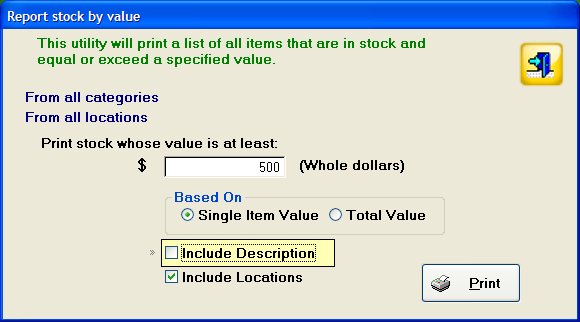
2. New report, Stock by Value (from the Report Menu) that allows you to print a list of all items exceeding a specified value and optionally location and description.
3. Zoom on image has been made larger.
Other mainly cosmetic changes.