Upon purchase of SportsTrak 3000 you will receive a 16 character code that uniquely identifies the purchaser and the software similar to this: C0PP9HFFTRPGI3Q.
Initial use of SportsTrak requires internet access
SportsTrak initially does not know who you are are whether you have purchased it.
When your PC is on-line the Registration button connects to our server where your unique identifier (above) identifies your status (Demo, Trial, or Full)
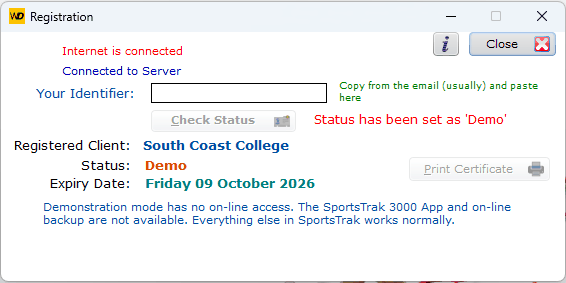

Demo restricts the functions availabe
Enter your 16 Character code then Check Status
SportsTrak checks the credentials of your program. It knows the client (usually a school name) and whether the software is on trial or fully paid, etc.
This is saved on the computer and after that internet access is not required to use the program.
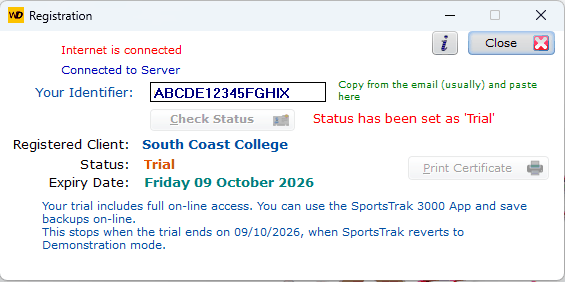
Client is known. Trial Period
If the status changes, usually going from Trial to Fully paid, you need to re-connect to the internet and check the Registration again.
It can also detect a change of Client name if that has been notified to us.
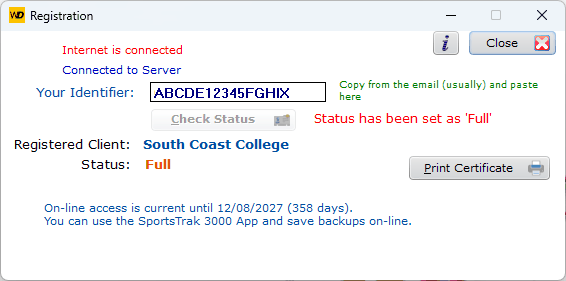
Fully authenticated
Running SportsTrak on other machines
Installation on another PC within your organisation is permitted, but must be done the same way as above... that is:
1. Run the setup program
2. Ensure there is a web connection
3. Use the Registration Code in this window