SportsTrak 3000 is a development from SportsTrak 2200 but has different data organisation so cannot directly read its carnival data. However a degree of interaction is possible.
SportsTrak 3000 requires the ability to interact with SportsTrak 2200 data for several reasons.
1. You may wish to convert a version 2200 carnival into version 3000 if you are upgrading.
2. Schools in an association may run both versions and yet need to send competitor lists to an inter-school carnival organiser
From Version 3000 you may:
Import any SportsTrak 2200 carnival.
This is important if you are upgrading from Version 2200 so you do not have to start building a program from scratch, and existing records are brought across. Ideally you would bring in sets of carnivals that belong in a lineage, such as Inter-House Athletics from several years.
Import/Export a CSV file of a program of events.
Working in ST3000 as an Inter-School organiser you may need to send a copy of the program to ST2200 users at other schools so they can add competitors. The format of the CSV file is identical between the two SportsTraks.
The one constraint is this: If you are sending a program of events to ST2200, the event numbering must be purely numeric 1,2,3...
ST3000 allows event numbering such as 3-A, 3-B, 3-C to better identify heats etc but SportsTrak 2200 does not handle that.
Import/Export SchoolTeam.CSV
This is a text file listing events and competitors that can be imported into the current carnival
Inter-School Carnival Strategy
It is useful for participating schools to be able to send a data file of competitors to the carnival organiser.
This file is referred to generally as the SchoolTeam.CSV file, although it usually is sent with a Team Code appended to the file name, such as SchoolTeam_PORT.csv.
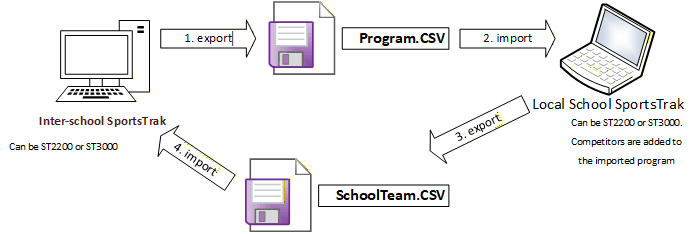
The way it usually works is this:
1.The I/S organiser sends a list of the program of events in Program.CSV to participants to import.
2.The participants have set up the carnival's basic details, Carnival Type, Dates, Age/Levels etc. They can then import the Program.csv. They may need to check that the Library of Events includes those events on the actual program.
Both SportsTraks have a guide where competitors from an inter-school carnival can be selected from the results of an inter-house carnival. Otherwise, students need to be imported into the Inter-school carnival from the school's database and then competitors entered into events.
3.The send those competitors back to the organiser in a SchoolTeam.CSV file
4.The organiser receives these files, and because they have the school's team code on them, are easily identifiable and can be placed in the same folder with a name conflict. eg SchoolTeam_PORT.csv, SchoolTeam_HAM.csv
These two file formats are common between ST2200 and ST3000 so it does not matter which version of SportsTrak is being used.