Background
You may import SportsTrak 2200 data into SportsTrak 3000 one carnival at a time. Because neither version of SportsTrak can read the type of data file used by the other, the import has to first migrate the ST2200 data to another format that ST3000 can also read. This makes it a two step process. Export from ST2000 to a common data format then import to ST3000 from that data. Sounds clunky but it works well.
Lineage
Lineages are fundamental to ST3000 because carnivals often operate in a sequence, but in ST2200 all carnivals are separate in different folders and have no actual connection with each other. So the imported carnival needs to be placed in a lineage.
Before Importing, have a think about the Lineage this carnival will belong to. If a suitable Lineage does not exist, you can either create one before this import, or allow the import to create one automatically.
If you have good data from SportsTrak 2200 in the past over several carnivals of the same type these should be imported into the same Lineage.
Thus, if you have Inter-house Aths from 2022, 2023, and 2024 in different folders, you could create a new lineage named Inter-House Aths and import each carnival into that Lineage.
Import - Two steps
Step 1 - Run the Export Utility

Button to run the Export
Step 2 - Import the exported data into SportsTrak 3000

Button to import the data created in Step 1
Note the Data Check button. It is always sensible to run this after any import
Import Details - How it works
SportsTrak 2200 works with each carnival in its own folder. You may select one of these folders and import that carnival into SportsTrak 3000.
There are two complications:
SportsTrak 3000 cannot read SportsTrak 2200 files at all. ST2200 uses TPS files; ST 3000 uses FIC files
SportsTrak 3000 data is differently organised compared with SportsTrak 2200.
An export utility, written in the ST2200 language, reads the set of TPS files in selected folder and writes it into a set of JSON text files.
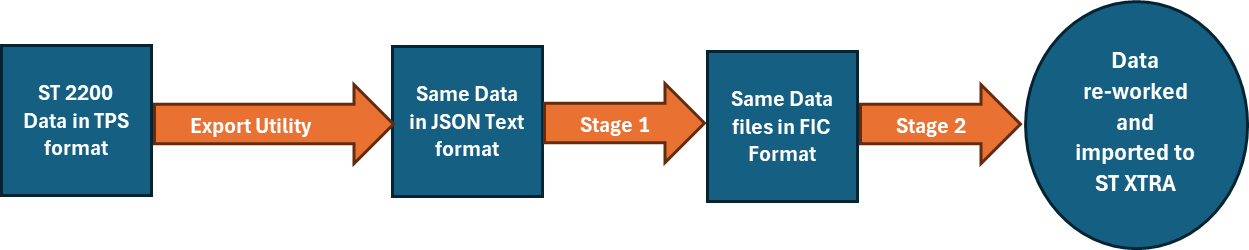
At Stage 1, that JSON files are written directly into FIC files, readable by ST 3000, but not structured correctly for ST 3000
At Stage 2, the FIC files are analysed and placed into the working FIC files used by ST 3000.
The imported carnival must be attached to a Lineage. You have the option of adding it to an existing lineage or allowing the creation of a new Lineage.
This is all done for you from the ST 2200 group of this menu.