You need to send a list of competitors to a higher carnival, an inter-school one most commonly. This list is a comma separated text file (CSV) named either simply SchoolTeam.CSV or SchoolTeam_XXXX.CSV where XXXX is your Team Code to be used at Inter-School.
To prepare your competitor list, you first require from the inter-school coordinator (ISC):
The Inter-School program of events
If both lower and higher carnivals are being managed using ST3000 the the Carnival Backup is the most complete way to go. You get the program of events, plus age groups, teams etc already entered.
If the ISC is using ST2200 and you are using ST3000, you cannot get a program backup as above. You need to Import Program from CSV.
Before importing the program you must create (or already have) a Lineage within which to place this Carnival. In particular this lineage must be set up correctly for Year Level or Age Basis Carnival.
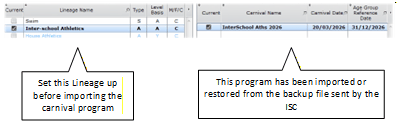
Set up the Lineage First
Team Code and Name under which your school is competing.
You may have house names against students but the competition requires a school identifying code.
eg Students are in Houses RED, BLUE, GRN, YLW but compete at inters-school as South Coast College SCC
However, at zone carnivals, the competitors may compete with the same team code at both carnival levels, so that is an option when exporting competitors.
eg Lower level was actually an inter-school with teams SCC, NCC, ECC, WCC and the competitors progress to a zone carnival competing for their school using the same code.
Number of Competitors required for each event type and whether to include emergencies
Options for the Creation of SchoolTeam.CSV
Your Situation |
Best way to do it |
You have SportsTrak 3000 and have results in the lower level carnival (eg Inter-House) |
Use the step by step guide on menu 9. Inter-School to connect the two carnivals and add your competitors |
You have SportsTrak 3000 but do not have a lower level carnival to draw competitors from. |
Import the Inter-School Carnival sent by the ISC Import your Students into that Program Select Competitors into the events based on whatever information you have. Create a SchoolTeam.CSV export file and send it to the ISC |
You don't have SportsTrak (probably not reading this then!) or cannot do the above. |
You may have been sent a SchoolTeam.CSV from the ISC file that just lists events, with spaces for competitors. Follow the instructions elsewhere in this guide and send the updated SchoolTeam.CSV back to ISC |