Participating schools need to have a copy of the program into which their own competitors can be entered.
After that, they send a data file name SchoolTeam.CSV (or similar) to the host organiser.
There are a few options for sending the carnival to these schools:
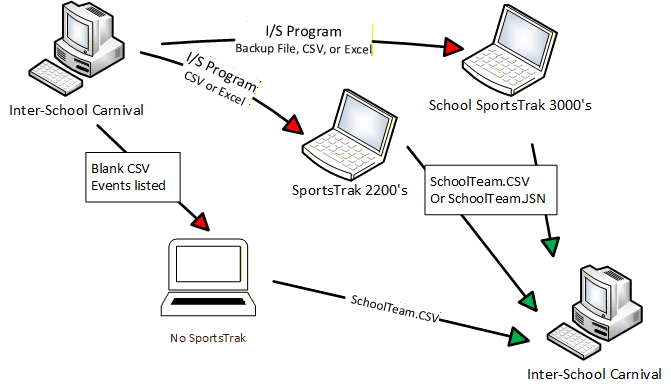
Data Movement Options
Send a Copy of the carnival to schools
Create an export file and email it to schools. There are 3 ways of exporting up the program. Each one tends to relates to how the school itself is set up with respect to SportsTrak: No SportsTrak, ST2200, or ST3000.
Ultimately, you could just send all three formats to all participants and they choose the most suitable for themselves.
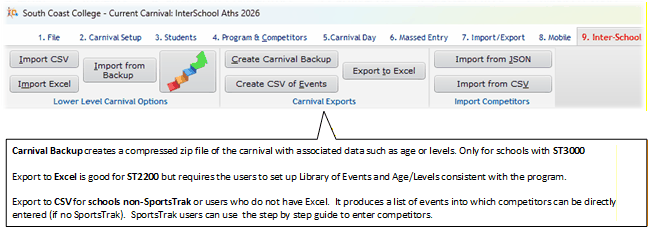
Export Options
Where are these files?
A Carnival Backup is a compressed zip file located in the Backup sub-folder of SportsTrak 3000
The CSV and Excel files are created in the common data folder, listed on the bottom of the main Window.
Schools also need instructions.
Instructions to the schools are contained as Word and PDF documents in the Documents sub-folder of SportsTrak3000.
There are different documents depending upon whether the participants use SportsTrak or not.
The Word documents can be edited with more specific information if required.
Schools need to know:
·Their Team Name and Code (and probably all Team Names and Codes.)
·Number of Competitors required per event
·Are emergencies required?