Both SportsTrak 3000 and SportsTrak 2200 have the ability to export the program to an Excel format.
The formats are slightly different because ST3000 has a column for the event sequence number as well as the event no. ST2200 only has event no.
Very Important
The Excel Import over-rides the Current Carnival in the Current Lineage. If the current carnival is important, then save it.
If the Current Carnival does not exist, you need to make one. You need age groups or year levels, scoring grades, library of events. You do not need events.
Click Select Import file, then Load Selected File for Checking
This fills the grid: Note that it identifies the file as SportsTrak 3000 format with the Sequence column C.
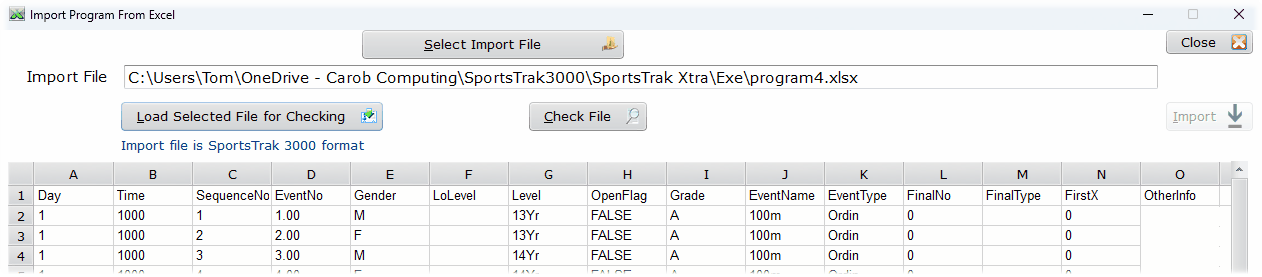
Having Selected an Excel file
Make sure that any Excel sent to a ST2200 user is the format below. SportsTrak 3000 typically would need to import this file if it was sent from an ST2200 computer.
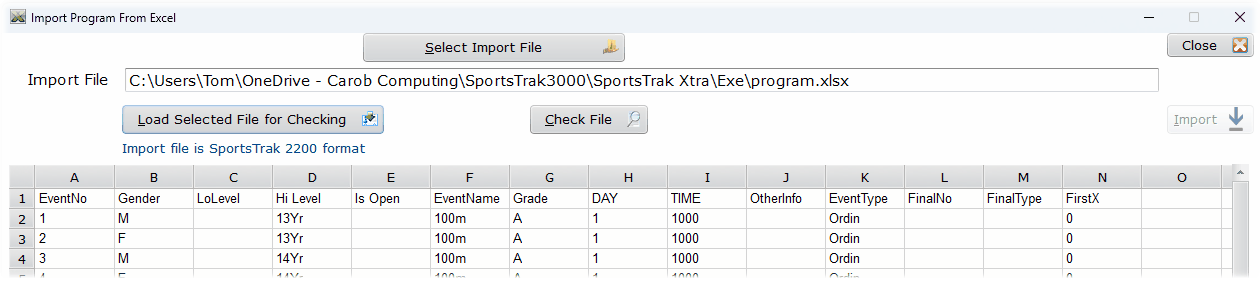
This file is SportsTrak 2200 compatible.
After Loading, click Check File
If no problems, you get:

Clean file
If there are issues found, columns get highlighted and erroneous rows are identified. In the case below, its all rows!
The cause of these errors is that the Lineage in to which the import is bring the Program has not been set up with a Library of Events or Age Groups.
This is actually easy enough to resolve, but must be sorted before importing again.
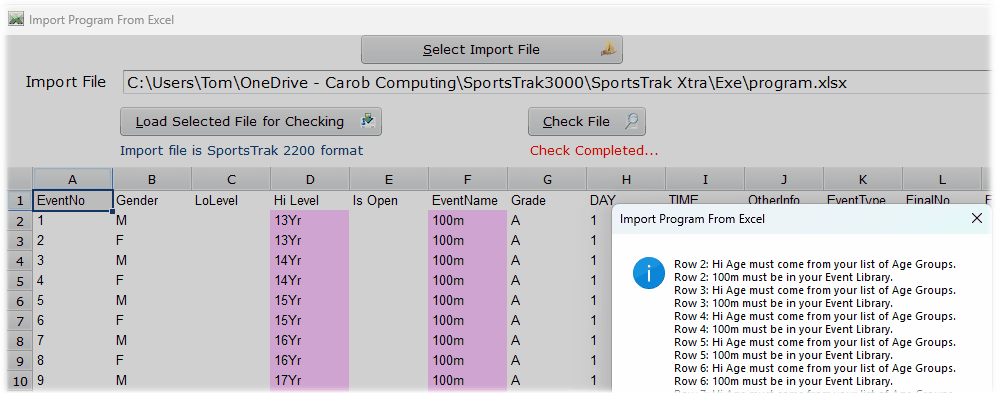
Problems with this one