The Age groups and Year Levels you enter determine the Level of the Events on the Program.
Age Based Carnivals
You must have Age Groups entered. You may have Year Levels
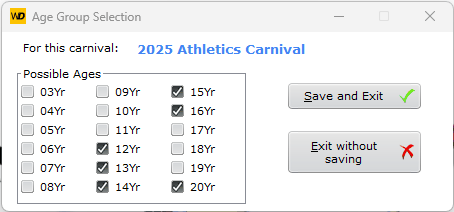
Typical set of Age Groups for a secondary school
SportsTrak 3000 supports both the 13Yr and the U/14 type notation. Choose the one this carnival uses with the Age Group Format setting in the carnival's details - Edit Carnivals, then Modify.
You can change it later at any time. SportsTrak converts the existing Age Groups, Students, Events, Records and Standards to the new notation for you, so there is nothing else to adjust.
Age groups imported from SportsTrak 2200 always arrive in the 13Yr format, whichever notation the 2200 carnival used. If you would rather use the U/14 style, simply change the Age Group Format after importing.
The age you enter above are the age groups that are used by the events, not specifically to cover all students.
Students either fit directly into one of these ages or these rules are used:
Students younger than 12Yr are automatically placed in 12Yr.
Students older than 16Yr are automatically placed in 20Yr.
Students older than 20Yr are also automatically placed in 20Yr.
Year Level Based Carnivals
You must have Year Levels entered.
You may have Age Groups. It advisable to have age groups if competitors from your Year Level based house carnival progress to an inter-school Age Based Carnival. SportsTrak can select best performers from your carnival based on their ages to compete in relevant age based events.
Select the relevant year levels
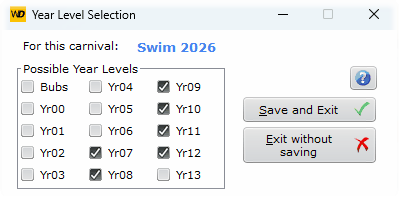
Typical Year Levels for secondary schools