CaRobComputing
  • Home
  • Software
    • All software

    • SportsTrak 3000
    • SportsTrak 3000 mobile
    • SportsTrak 2200
    • BookIt3
    • NetBookIt3
    • SciList
  • Downloads
  • Updates
  • User guide
  • Support
  • Contact
  • Basket
  • Sign in
User guide / Setting up a Carnival / Pre-Entry of Competitors / Entry via Grid

Contents

  • Title Page
  • License Agreement
  • Skills Required by Users of SportsTrak 3000
  • Registration
  • About SportsTrak 3000
  • What does SportsTrak do?
  • The Menus
  • Program Behaviour
  • Setting up a Carnival
  • Create a Carnival with a Lineage
  • Check Related Data
  • Event Library
  • Ages and Years
  • Score System
  • Records
  • Program of Events Menu
  • Program
  • Add/Edit an Event
  • Non-Sporting Item on Program
  • Set Lanes
  • Pre-Entry of Competitors
  • Entry via Grid
  • Entry via Competitor
  • Entry via Event
  • Modify program based on Competitor Numbers
  • Heats and Finals
  • How SportsTrak Processes Heats
  • Heats Instructions
  • Standards
  • Student History
  • Carnival Day
  • Using Multiple Computers for Results Entry
  • Massed Entry
  • Entering Cross Country Results
  • Import-Export
  • Inter-School Management
  • SportsTrak 2200
  • Lynx
  • Mobile Management
  • Structure of SportsTrak
  • Back up
  • Restore
  • Backing Up Everything Yourself
  • SportsTrak's Data Files
  • CSV Files Explained
  • Changes from SportsTrak 2200

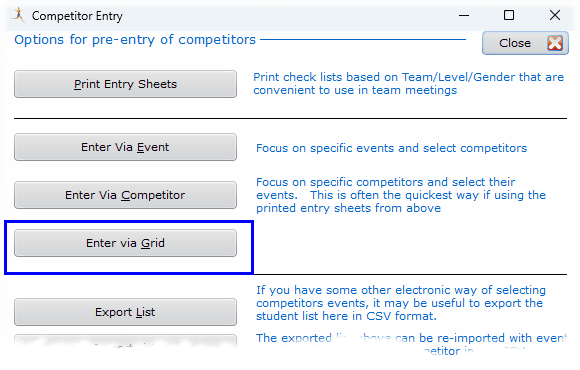
Entry via Grid

CompEntryViaGrid

You get a window where you select the Age/Level/House/Gender that the entry form relates to.
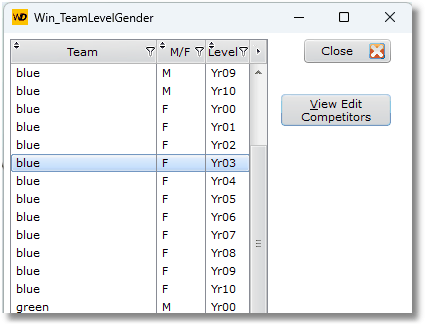
WinTeamLevelGender

Using the button View Edit Competitors above:
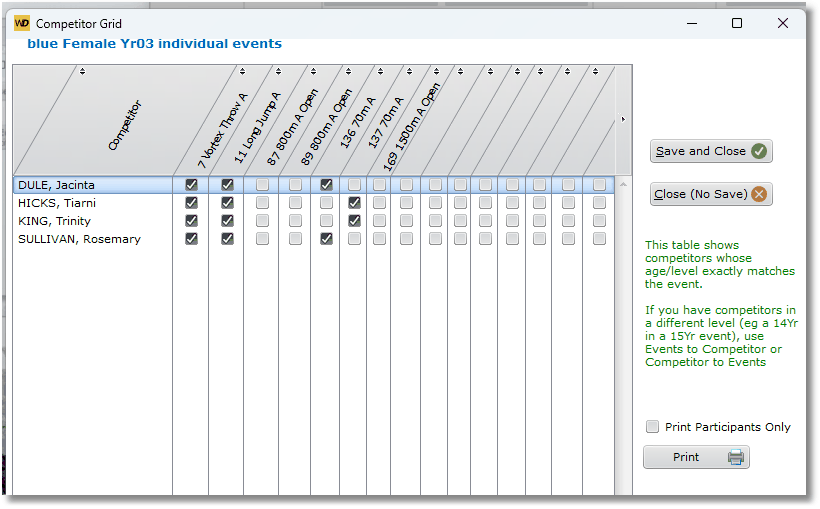
FilledCompGrid

Tick the relevant events for each competitor, then Save and Close

Previous Pre-Entry of Competitors
Next Entry via Competitor
CaRob Computing Pty Ltd

153 Must Street, Portland, VIC 3305, Australia

office@carobcom.com · 03 5523 2120

ABN 47 007 303 557

Products

  • SportsTrak 3000
  • SportsTrak 3000 mobile
  • SportsTrak 2200
  • BookIt3
  • NetBookIt3
  • SciList
  • All software

Help

  • SportsTrak 3000 user guide
  • Downloads
  • Release notes
  • Support & FAQ
  • Contact us
  • Terms & conditions
  • Privacy policy

© 2026 CaRob Computing. All rights reserved.